


Aadhaar Update For Minor Step By Step 2026: बच्चों के आधार कार्ड में बायोमेट्रिक और फोटो अपडेट करने की पूरी प्रक्रिया; यहाँ देखें स्टेप-बाय-स्टेप गाइड!
Aadhaar Update For Minor Step By Step 2026: आज के समय में आधार कार्ड केवल बड़ों के लिए ही नहीं, बल्कि बच्चों के लिए भी उतना ही महत्वपूर्ण दस्तावेज बन चुका है। स्कूल एडमिशन से लेकर सरकारी योजनाओं का लाभ लेने तक, ‘बाल आधार’ (Baal Aadhaar) अनिवार्य है। लेकिन क्या आप जानते हैं कि बच्चों का आधार कार्ड बड़ों की तरह हमेशा के लिए वैसा ही नहीं रहता?
भारतीय विशिष्ट पहचान प्राधिकरण (UIDAI) के नियमों के अनुसार, बच्चों के आधार में अनिवार्य बायोमेट्रिक अपडेट (Mandatory Biometric Update) करना आवश्यक होता है। यदि आप “Aadhaar Update For Minor
1. बच्चों के आधार में अपडेट की आवश्यकता कब होती है?
Aadhaar Update For Minor Step By Step 2026: UIDAI ने बच्चों के आधार अपडेट के लिए दो मुख्य पड़ाव तय किए हैं:
- 5 वर्ष की आयु पर: जब बच्चा 5 साल का हो जाता है, तब उसके हाथों की उंगलियों के निशान और आंखों की पुतलियों (Iris) को पहली बार रजिस्टर करना होता है।
- 15 वर्ष की आयु पर: किशोरावस्था में बायोमेट्रिक्स में अंतिम बदलाव होते हैं, इसलिए 15 साल पूरे होने पर दोबारा अपडेट करना अनिवार्य है।
नोट: यह अपडेट ‘अनिवार्य’ है। यदि आप इसे समय पर नहीं करते हैं, तो बच्चे का आधार कार्ड ‘निष्क्रिय’ (Inactivate) हो सकता है।
2. आवश्यक दस्तावेज
Aadhaar Update For Minor Step By Step 2026: एक माइनर (Minor) का आधार अपडेट करने के लिए आपको निम्नलिखित दस्तावेजों की आवश्यकता होगी:
- माता या पिता का आधार कार्ड (पहचान के प्रमाण के रूप में)।
- एड्रेस प्रूफ (यदि माता-पिता के आधार में पता अलग है)।
3. स्टेप-बाय-स्टेप अपडेट प्रक्रिया (Step By Step Process)
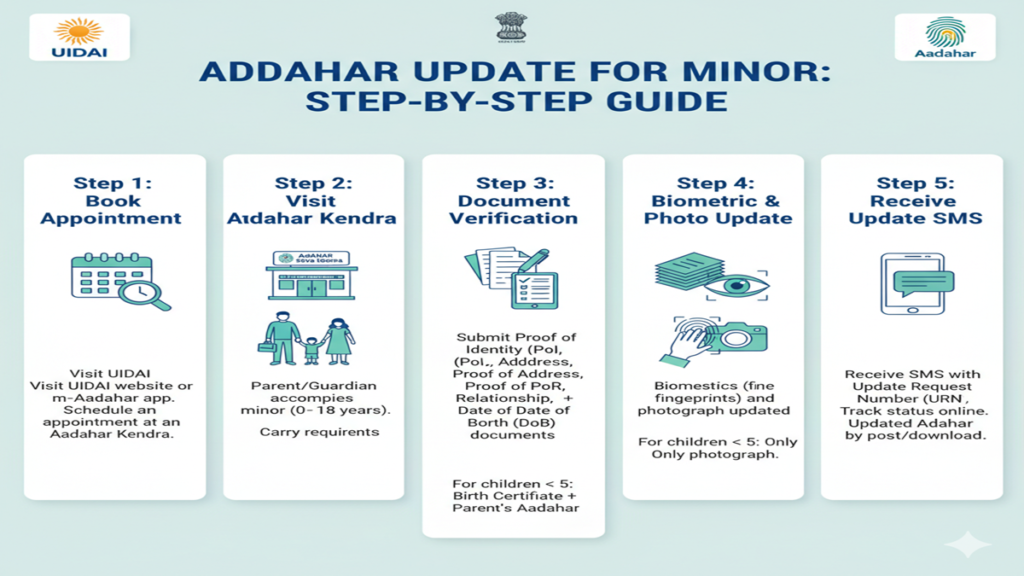
Aadhaar Update For Minor Step By Step 2026: बच्चों का बायोमेट्रिक अपडेट ऑनलाइन नहीं किया जा सकता (सुरक्षा कारणों से), इसके लिए आपको आधार केंद्र जाना होगा। प्रक्रिया नीचे दी गई है:
स्टेप 1: ऑनलाइन अपॉइंटमेंट बुक करें (Book Appointment Online) भीड़ से बचने के लिए UIDAI की आधिकारिक Aadhaar Update For Minor Step By Step 2026: वेबसाइट (myaadhaar.uidai.gov.in) पर जाएं और ‘Book an Appointment’ पर क्लिक करें। अपना शहर चुनें और बच्चे के लिए स्लॉट बुक करें।
स्टेप 2: आधार सेवा केंद्र (ASK) पहुंचें तय समय पर बच्चे और जरूरी दस्तावेजों के साथ आधार केंद्र जाएं। वहां आपको एक ‘Enrolment/Update Form’ भरना होगा।
स्टेप 3: बायोमेट्रिक कैप्चर आधार अधिकारी बच्चे की फोटो लेंगे और उसकी 10 उंगलियों के निशान और आइरिस स्कैन करेंगे। 5 साल से कम उम्र के बच्चों के मामले में केवल फोटो और माता-पिता का डेमोग्राफिक डेटा इस्तेमाल होता है, लेकिन 5 साल से ऊपर के बच्चों का पूरा बायोमेट्रिक लिया जाता है।
स्टेप 4: पावती रसीद (Acknowledgement Slip) अपडेट पूरा होने के बाद आपको एक रसीद मिलेगी जिसमें Update Request Number (URN) होगा। इसका उपयोग आप ऑनलाइन स्टेटस ट्रैक करने के लिए कर सकते हैं।
4. शुल्क (Fees & Charges) 2026
- अनिवार्य बायोमेट्रिक अपडेट (5 और 15 वर्ष): यह पूरी तरह से नि:शुल्क (FREE) है।
- डेमोग्राफिक अपडेट (नाम, पता आदि): इसके लिए ₹50 का शुल्क लिया जाता है।
- बायोमेट्रिक अपडेट (अनिवार्य समय के अलावा): इसके लिए ₹100 का शुल्क देना होता है।
5. अपडेट होने में कितना समय लगता है?
Aadhaar Update For Minor Step By Step 2026: आमतौर पर आधार अपडेट होने में 7 से 15 कार्य दिवस (Working Days) का समय लगता है। अपडेट होने के बाद आप UIDAI की वेबसाइट से ‘e-Aadhaar’ डाउनलोड कर सकते हैं या नया पीवीसी कार्ड ऑर्डर कर सकते हैं।
4.
Q1: क्या मैं घर बैठे बच्चे का बायोमेट्रिक अपडेट कर सकता हूँ?
Ans: नहीं, उंगलियों के निशान और आंखों के स्कैन के लिए फिजिकल उपस्थिति और आधार केंद्र की मशीनों की आवश्यकता होती है।
Q2: क्या माता-पिता का साथ होना जरूरी है?
Ans: हाँ, 18 साल से कम उम्र के बच्चों के लिए माता या पिता (अभिभावक) का होना और उनका आधार लिंक होना आवश्यक है।
Q3: मेरा बच्चा 16 साल का हो गया है और अभी तक अपडेट नहीं किया, क्या करें?
Ans: घबराएं नहीं, तुरंत नजदीकी आधार केंद्र जाकर अपडेट कराएं। देरी होने पर भविष्य में सिम कार्ड लेने या बैंक खाता खोलने में समस्या हो सकती है।
Conclusion: समय पर अपडेट है समझदारी!
Aadhaar Update For Minor Step By Step की इस जानकारी का पालन करके आप अपने बच्चे के भविष्य के कार्यों को आसान बना सकते हैं। आधार केवल एक कार्ड नहीं, बल्कि एक डिजिटल पहचान है। इसे अपडेट रखना आपकी जिम्मेदारी है।
A Complete Parent’s Guide: Aadhaar Update For Minor Step By Step
Aadhaar Update For Minor Step By Step In India, Aadhaar has become an indispensable identity document, seamlessly woven into the fabric of daily life—from school admissions and availing government scholarships to opening bank accounts and obtaining a SIM card. For children, it’s known as Baal Aadhaar, issued in blue to distinguish it from the standard white adult card. However, a child’s Aadhaar is not a “set it and forget it” document. It has a critical expiry feature and requires mandatory updates as the child grows.
Many parents find the process confusing. When is it required? What documents are needed? Is a biometric update mandatory? This definitive guide will walk you through every step of the Aadhaar update process for minors, demystifying the requirements and providing clear, actionable instructions.
Understanding Baal Aadhaar & The Mandatory Update Cycle
Aadhaar Update For Minor Step By Step 2026: A Baal Aadhaar is issued to children below 5 years of age. At this stage, only demographic details (name, date of birth, gender, address) and a photograph of the child are captured. Biometrics (fingerprints and iris) are not collected because they are still developing and are not stable. The UIDAI, therefore, links the child’s Aadhaar to the biometrics of one parent or guardian (usually the mother or father), which serves as authentication.
This design leads to two crucial, mandatory update milestones:
- Mandatory Biometrics Update at Age 5: When the child turns 5, the Baal Aadhaar must be updated with the child’s fresh photograph and biometrics (ten fingerprints and iris scan). This is the first critical update to establish the child’s own unique biometric identity.
- Mandatory Biometrics Re-Update at Age 15: When the child turns 15, a second biometric update is compulsory. This is because biometrics can change significantly during the growth spurts of adolescence. This update ensures the Aadhaar database reflects the young adult’s stable biometrics.
Important Note: Between these milestones, or at any time, you can also update other demographic details like a change in address, school, or even correcting the child’s name if required.
Step-by-Step Guide to Update Your Child’s Aadhaar
Aadhaar Update For Minor Step By Step 2026: You have two primary channels to complete the update: Online (for address only) and Offline (for all updates, including biometrics). The offline method is the only way to complete the mandatory age 5 and age 15 biometric updates.
A. Online Update (Only for Demographic Changes like Address)
Aadhaar Update For Minor Step By Step 2026: This method is quick and convenient but is strictly limited to updating the child’s address. You cannot update biometrics, name, or date of birth online for a minor.
Step 1: Access the Official Portal
Visit the official UIDAI Self Service Update Portal (SSUP): https://ssup.uidai.gov.in/. Do not use any third-party websites.
Step 2: Login with Child’s Aadhaar
- Aadhaar Update For Minor Step By Step 2026: Click on “Update Demographics Data Online.”
- Enter the child’s 12-digit Aadhaar Number and the security (Captcha) code.
- An OTP will be sent to the mobile number registered with the child’s Aadhaar. This is the number linked to the parent/guardian at the time of enrolment.
Step 3: Select Address Update
- After OTP verification, you will see the current details.
- Click on the option to update the address.
Step 4: Provide New Address Proof
- You can either:
- Use Address Proof: Upload a scanned copy of a valid proof of address document (like a parent’s passport, bank statement, gas bill, etc.). The document can be in the name of the child or the parent/guardian whose biometrics are linked.
- Use “Address Letter” if the address is already verified and present in the UIDAI database.
Step 5: Review, Submit & Note URN
- Carefully review the new address entered.
- Submit the request. Note this down for tracking the status.
Step 6: Visit Aadhaar Centre for Verification (If Required)
Aadhaar Update For Minor Step By Step 2026: In some cases, UIDAI may flag the request for verification. If so, you will receive an notification to visit a nearby Aadhaar centre with original documents to complete the process. Otherwise, the address will be updated in a few days.
This is the most comprehensive method and the only way to fulfill the mandatory biometric updates at age 5 and 15.
Step 1: Locate a Permanent Aadhaar Enrolment Centre
- Use the UIDAI locator: https://appointments.uidai.gov.in/easearch.aspx.
- It is highly recommended to book an appointment online through the same portal to avoid long queues. Walk-ins are accepted but may involve waiting.
Step 2: Prepare the Required Documents
Aadhaar Update For Minor Step By Step 2026: Carry the following original documents and one photocopy of each:
- Child’s Proof of Identity (PoI): Birth Certificate is the most crucial and universally accepted. School ID card (if issued) can also work.
- Child’s Proof of Address (PoA): This could be a school certificate with address, or the address proof of the parent (if the child has no individual proof).
- Proof of Relationship (PoR): This is mandatory. The Birth Certificate serves as PoR, linking the child to the parents. Alternatively, a passport of the parent showing the child’s name can be used.
- Aadhaar of the Parent/Guardian: The Aadhaar card of the accompanying parent whose biometrics are linked to the child’s Aadhaar. This is essential for authentication.
- Child’s Baal Aadhaar Card: Carry the original blue Baal Aadhaar card or a copy with the Aadhaar number.
Step 3: Visit the Centre with the Child
- Aadhaar Update For Minor Step By Step 2026: The child’s physical presence is absolutely mandatory for photograph and biometric capture.
- The parent/guardian whose biometrics are linked must also accompany the child, as their biometrics will be used to authenticate and access the child’s record.
Step 4: Fill the Aadhaar Update/Correction Form
- Fill in the child’s Aadhaar number and carefully tick the fields that need to be updated: Name, Date of Birth, Address, Biometrics, etc.
- Ensure the form is signed by the accompanying parent/guardian.
Step 5: Biometric Authentication & Data Submission
- The executive will first authenticate the request by scanning the fingerprints of the accompanying parent.
- Subsequently, the child’s fresh photograph, ten fingerprints, and both iris scans will be captured.
- The executive will enter the updated demographic details as per your form and documents.
Step 6: Review & Acknowledge
- Aadhaar Update For Minor Step By Step 2026: You will be shown a preview of the updated details on the screen. Scrutinize every detail—name, spelling, date of birth, address—before confirming.
- Upon confirmation, you will receive an Acknowledgment Slip. This slip contains a 14-digit Update Request Number (URN).
Step 7: Track Update Status & Receive Updated Aadhaar
- Once processed, the updated Aadhaar card will be dispatched to your registered address. The blue colour (for children below 5) will change to the standard white Aadhaar card after the biometric update at age 5.
Crucial Points to Remember
- Aadhaar Update For Minor Step By Step 2026: No Fee for Biometric Update (Age 5/15): The mandatory biometric updates at ages 5 and 15 are completely free of charge.
- Fee for Other Updates: If you are updating demographic details (like address) at an enrolment centre, a nominal fee of ₹ 50 may be charged.
- Mobile Number is Key: Ensure the mobile number registered with your child’s Aadhaar is active. It is the lifeline for OTPs and update notifications.
- Document Validity: All documents submitted must be valid and as per the UIDAI’s approved document list.
- Post-Update: After the age 15 update, the child’s Aadhaar is considered mature and will not require further mandatory biometric updates.
Frequently Asked Questions (FAQs)
1. My child just turned 5. Is it urgent to update the Aadhaar biometrics immediately? Will the old one become invalid?
Aadhaar Update For Minor Step By Step 2026: While the Baal Aadhaar does not have a hard “expiry date,” UIDAI mandates that the biometrics be updated by the time the child turns 5. Services that require biometric authentication (like certain DSAs for scholarships) may start failing if the update is not done. It is advisable to complete the update within a few months of the child’s 5th birthday to ensure seamless service delivery.
2. Can I update my child’s Aadhaar details (like address) online without updating biometrics?
Aadhaar Update For Minor Step By Step 2026: Yes, but with a major limitation. You can update only the address online via the SSUP portal. To update the child’s name, date of birth, or gender, or to perform the mandatory biometric updates, you must visit a physical Aadhaar Enrolment Centre.
3. What if the mobile number linked to my child’s Aadhaar is no longer active?
Aadhaar Update For Minor Step By Step 2026: This is a common hurdle. To update the mobile number, you must visit an Aadhaar Enrolment Centre with the child, the parent whose biometrics are linked, and original documents. The executive will authenticate the parent’s biometrics and update the mobile number in the system. This must be done before attempting any online updates.
4. Who should accompany the child to the enrolment centre? What if that parent is unavailable?
Aadhaar Update For Minor Step By Step 2026: Ideally, the parent (mother/father) whose biometrics were registered during the initial enrolment should accompany the child, as their biometrics are required for authentication. If that parent is permanently unavailable, you will need to follow the Guardianship update process, which may require additional documentary proof (like a court guardianship order) to link the Aadhaar to a new guardian. Contact the centre operator in advance for such scenarios.
5. How long does it take to receive the updated Aadhaar card after the visit?
Aadhaar Update For Minor Step By Step 2026: After successful processing at the enrolment centre, it typically takes 2-3 weeks for the updated Aadhaar letter to be delivered to your registered address by India Post. You can always download a digital version (e-Aadhaar) from the UIDAI website within a few days of the update by using the URN.
Aadhaar Update For Minor Step By Step 2026: Navigating your child’s Aadhaar updates is a key parental responsibility in the digital age. By understanding the mandatory milestones—age 5 and age 15—and following the outlined steps, you can ensure your child’s identity document remains valid, functional, and ready to unlock essential services throughout their growing years. Mark these dates on your calendar, keep your documents organized, and approach the process with the confidence that you are securing your child’s official identity in India.