


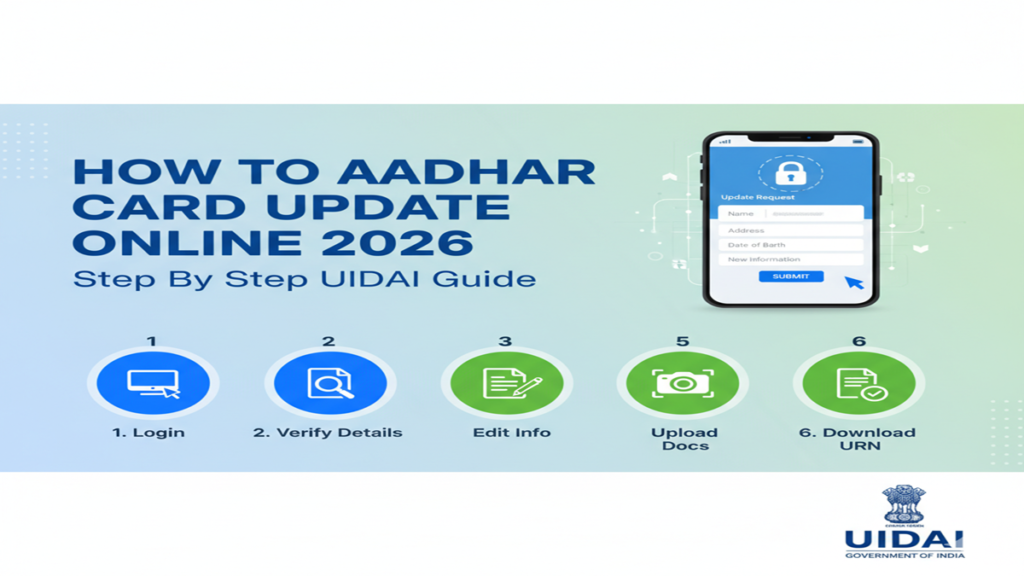
How To Aadhar Card Update Online: घरबसल्या आधार कार्डमध्ये करा सुधारणा; जाणून घ्या २०२६ मधील सर्वात सोपी ऑनलाईन पद्धत!
How To Aadhar Card Update Online: Introduction: आधार कार्ड हे आजच्या काळात आपल्या ओळखीचे सर्वात महत्त्वाचे दस्तऐवज आहे. सरकारी कामांपासून ते बँक खात्यापर्यंत प्रत्येक ठिकाणी आधार कार्डची गरज भासते. अनेकदा आधार कार्डवरील नाव, पत्ता किंवा जन्मतारीख चुकीची असते किंवा जुनी झालेली असते.
सुदैवाने, UIDAI (भारतीय विशिष्ट ओळख प्राधिकरण) ने नागरिकांसाठी ‘माय आधार’ (myAadhar) हे पोर्टल उपलब्ध करून दिले आहे, ज्याद्वारे तुम्ही केंद्रावर न जाता घरबसल्या अनेक गोष्टी अपडेट करू शकता. या लेखात आपण आधार कार्ड ऑनलाईन अपडेट करण्याची इत्यंभूत माहिती घेणार आहोत.
१. ऑनलाईन काय काय अपडेट करता येते? (What can be updated online?)
How To Aadhar Card Update Online: UIDAI च्या ऑनलाईन पोर्टलवरून तुम्ही खालील गोष्टी अपडेट करू शकता:
- पत्ता (Address): सर्वात जास्त अपडेट केली जाणारी गोष्ट.
- नाव (Name): लग्नानंतर किंवा स्पेलिंगमध्ये बदल असल्यास.
- जन्मतारीख (Date of Birth): केवळ एकदाच बदलता येते.
- लिंग (Gender).
- दस्तऐवज अपडेट (Document Update): जर तुमचे आधार १० वर्षांपेक्षा जुने असेल.
टीप: मोबाईल नंबर, ईमेल आयडी आणि बायोमेट्रिक्स (फोटो, फिंगरप्रिंट) अपडेट करण्यासाठी तुम्हाला जवळच्या आधार केंद्रावर जावे लागते.
२. आधार ऑनलाईन अपडेट करण्यासाठी आवश्यक गोष्टी
How To Aadhar Card Update Online: १. आधारशी लिंक असलेला मोबाईल नंबर (OTP साठी). २. आवश्यक दस्तऐवज (उदा. पत्त्यासाठी लाईट बिल किंवा ओळखीसाठी पॅन कार्ड). ३. स्कॅन केलेली कागदपत्रांची प्रत (PDF किंवा JPEG फॉरमॅट).
३. ऑनलाईन अपडेट करण्याची स्टेप-बाय-स्टेप प्रक्रिया (Process)
How To Aadhar Card Update Online: Step 1: अधिकृत पोर्टलला भेट द्या सर्वप्रथम myaadhaar.uidai.gov.in या वेबसाईटवर जा.
Step 2: लॉगिन करा ‘Login’ बटणावर क्लिक करा. तुमचा आधार नंबर आणि कॅप्चा कोड टाका. त्यानंतर तुमच्या लिंक असलेल्या मोबाईलवर एक OTP येईल, तो प्रविष्ट करून लॉगिन करा.
Step 3: सेवेची निवड करा डॅशबोर्डवर तुम्हाला अनेक पर्याय दिसतील. जर तुम्हाला पत्ता बदलायचा असेल, तर ‘Address Update’ वर क्लिक करा. जर दस्तऐवज अपडेट करायचे असतील, तर ‘Document Update’ निवडा.
Step 4: माहिती भरा तुम्हाला जी माहिती बदलायची आहे ती अचूक भरा. जसे की नवीन पत्ता किंवा नावात बदल.
How To Aadhar Card Update Online: Step 5: कागदपत्रे अपलोड करा नोंदवलेल्या माहितीसाठी अधिकृत पुरावा (Supporting Document) स्कॅन करून अपलोड करा.
Step 6: फी भरा ऑनलाईन अपडेटसाठी साधारणतः ५० रुपये फी असते. तुम्ही ती UPI, डेबिट कार्ड किंवा नेट बँकिंगद्वारे भरू शकता.
Step 7: SRN नंबर जतन करा या नंबरद्वारे तुम्ही तुमच्या अर्जाचे स्टेटस तपासू शकता.
४. अर्जाचे स्टेटस कसे तपासायचे? (Check Status)
How To Aadhar Card Update Online: अपडेटसाठी अर्ज केल्यानंतर साधारणतः ७ ते १५ दिवसांत प्रक्रिया पूर्ण होते. तुम्ही पोर्टलवर जाऊन ‘Check Enrolment & Update Status’ या पर्यायावर क्लिक करून तुमचा SRN नंबर टाकून स्टेटस पाहू शकता.
५. सतत विचारले जाणारे ५ प्रश्न (FAQs)
Q1: आधार कार्ड ऑनलाईन अपडेट करण्यासाठी मोबाईल नंबर लिंक असणे गरजेचे आहे का?
Ans: हो, ऑनलाईन कोणत्याही बदलासाठी आधारशी मोबाईल नंबर लिंक असणे अनिवार्य आहे, कारण सर्व पडताळणी OTP द्वारे होते.
Q2: १० वर्षांनंतर आधार अपडेट करणे सक्तीचे आहे का?
Ans हो, UIDAI च्या नवीन नियमांनुसार, ज्यांचे आधार १० वर्षांपूर्वी बनले आहे आणि कधीही अपडेट झालेले नाही, त्यांना ओळखीचा आणि पत्त्याचा पुरावा पुन्हा अपलोड करणे आवश्यक आहे.
Q3: लग्नानंतर आधारवर नाव कसे बदलावे?
Ans: लग्नानंतर नाव बदलण्यासाठी तुम्ही ‘मॅरेज सर्टिफिकेट’ किंवा राजपत्राचा (Gazette) वापर करून ऑनलाईन अर्ज करू शकता.
Q4: ऑनलाईन अपडेट फी किती आहे?
Ans: ऑनलाईन पत्ता किंवा इतर माहिती बदलण्यासाठी ५० रुपये फी आहे. ठराविक काळासाठी दस्तऐवज अपडेट मोफत असू शकतात.
Q5: ऑनलाईन अपडेट नाकारले गेले (Reject) तर काय करावे?
Ans: जर कागदपत्रे स्पष्ट नसतील किंवा माहिती चुकीची असेल तर अर्ज नाकारला जाऊ शकतो. अशा वेळी पुन्हा एकदा योग्य कागदपत्रांसह अर्ज करा किंवा आधार केंद्रावर संपर्क साधा.
Conclusion: आधार अपडेट ठेवा, सुरक्षित राहा!
How To Aadhar Card Update Online ही प्रक्रिया अत्यंत पारदर्शक आणि सोपी आहे. आपले आधार कार्ड वेळेवर अपडेट ठेवल्यामुळे सरकारी योजनांचा लाभ घेताना कोणतीही अडचण येत नाही. वरील स्टेप्स फॉलो करून तुम्हीही आजच तुमचे आधार तपासून घ्या!
How To Update Your Aadhaar Card Online in 2026: A Step-by-Step UIDAI Guide
Introduction
How To Aadhar Card Update Online 2026 In an increasingly digital India, your Aadhaar card has evolved from a simple identification document to a crucial key for accessing government services, financial products, and digital authentication. As we move into 2026, the Unique Identification Authority of India (UIDAI) continues to streamline and enhance the Aadhaar update process, making it more accessible and user-friendly than ever before. Keeping your Aadhaar information current is not just a recommendation—it’s essential for seamless access to services and compliance with KYC norms.
Whether you’ve changed your residence, updated your mobile number, noticed errors in your demographic details, or simply need to refresh your photograph, this comprehensive guide will walk you through the entire online update process step-by-step. The UIDAI’s 2026 updates have introduced several improvements to the online portal and mobile app, reducing processing times and enhancing security features.
Why Updating Your Aadhaar Matters in 2026
How To Aadhar Card Update Online: Legal Compliance and Validity: An updated Aadhaar ensures compliance with government regulations and maintains the document’s validity for all official purposes.
Accurate Service Delivery: Current information ensures you receive government subsidies, benefits, and communications correctly.
How To Aadhar Card Update Online: Financial Transactions: Updated KYC details are mandatory for uninterrupted banking, investment, and insurance services.
Digital Authentication: With Aadhaar-based authentication becoming more widespread, current details prevent verification failures.
Security Enhancement: Regular updates help protect against identity misuse by ensuring only you have access to linked services.
Documents Required for Aadhaar Update
How To Aadhar Card Update Online: Before initiating the update process, ensure you have the following:
- Proof of Identity: Passport, PAN card, Driving License, etc.
- Proof of Address: Utility bills (not older than 3 months), passport, bank statements, etc.
- Proof of Relationship (if updating family details): Marriage certificate, birth certificate, etc.
- Current Mobile Number: Registered with Aadhaar for OTP authentication
Note: All documents should be valid and clearly legible. UIDAI accepts documents in English or Hindi languages. Regional language documents may require translation attested by a gazetted officer.
Step-by-Step Guide to Update Aadhaar Online in 2026
Step 1: Access the Official UIDAI Portal
How To Aadhar Card Update Online: Navigate to the official UIDAI website: uidai.gov.in or the direct update portal: myaadhaar.uidai.gov.in. Beware of phishing sites—always verify you’re on the official government portal with “https://” and a padlock symbol.
Step 2: Login to Your Account
How To Aadhar Card Update Online: Click on the “Login” button and enter your 12-digit Aadhaar number. You’ll receive an OTP on your registered mobile number. Enter this OTP to authenticate and access your dashboard.
Pro Tip: If you’ve lost access to your registered mobile number, you’ll need to visit an Aadhaar Enrollment Center for recovery before proceeding with online updates.
Step 3: Select Update Type
Once logged in, you’ll see two primary options:
- Update Demographic Information (name, address, date of birth, gender)
- Update Biometric Information (photograph, fingerprints, iris scan)
How To Aadhar Card Update Online: Select the appropriate category based on what needs updating. For 2026, the interface has been simplified with clearer categorization and guidance.
Step 4: Fill the Update Request Form
How To Aadhar Card Update Online: You’ll be directed to a pre-filled form with your current Aadhaar details. Make the necessary corrections or updates in the respective fields. The 2026 interface includes real-time validation that alerts you to formatting errors immediately.
Important Guidelines:
- Name changes require supporting documentation
- Address updates can be done using the “Address Update” letter received from various service providers
- Date of birth changes have stricter requirements and may take longer for verification
Step 5: Upload Supporting Documents
How To Aadhar Card Update Online: Scan clear, legible copies of your supporting documents. The 2026 portal accepts files in JPEG, PNG, and PDF formats up to 2MB. Ensure:
- Documents are clearly visible without glare or shadows
- All four corners of documents are captured
- File size is within specified limits
Step 6: Review and Submit
How To Aadhar Card Update Online: Carefully review all entered information and uploaded documents. The 2026 interface includes a summary page highlighting all changes being made. Once verified, submit your request. You’ll receive an Update Request Number (URN) via SMS and email—save this for tracking purposes.
Step 7: Make Payment
The online update requires a nominal fee of ₹50 (subject to change) for demographic updates and ₹100 for biometric updates. The 2026 portal accepts multiple payment methods:
- Credit/Debit Cards
- Net Banking
- UPI (including newer options available in 2026)
- Digital Wallets
Step 8: Track Your Update Request
Use your URN to track the status through:
- The “Check Status” option on the UIDAI portal
- The mAadhaar mobile app
- SMS service (send your URN to 51969)
Processing time typically ranges from 7-15 working days in 2026, with most demographic updates being completed faster than biometric updates.
Step 9: Download Updated Aadhaar
Once approved, you’ll receive an SMS notification. Log in to the portal and download your updated Aadhaar. The 2026 system provides both a standard PDF and a digitally signed secure PDF with enhanced security features.
Step 10: Order a PVC Aadhaar Card (Optional)
For a physical copy, you can order a PVC Aadhaar card for ₹50. This durable, pocket-sized card includes a secure QR code and is delivered to your updated address within 5-7 working days.
Special Scenarios and 2026 Enhancements
Bulk Updates for Families
The 2026 portal introduces a streamlined family update feature allowing heads of households to update details for multiple family members in a single session, reducing repetitive documentation uploads.
Video-Based Verification
For exceptional cases where document validation is challenging, UIDAI now offers optional video verification appointments through the portal, reducing the need for physical visits.
Integration with DigiLocker
Seamless integration with DigiLocker allows automatic fetching of certain government-issued documents, eliminating the need for manual uploads in many cases.
Regional Language Support
Enhanced multilingual support now includes real-time translation for all form fields across 22 scheduled languages, making the process accessible to diverse linguistic groups.
AI-Powered Document Validation
The 2026 system uses artificial intelligence to pre-validate uploaded documents, providing immediate feedback on document quality and acceptability before submission.
The mAadhaar Mobile App: Update on the Go
The mAadhaar app has become significantly more powerful in 2026, offering nearly all website functionalities in a mobile-optimized interface. Key features include:
- Biometric locking/unlocking directly from your smartphone
- Location-based services that find the nearest enrollment centers
- QR code scanning for instant verification
- Secure sharing of masked Aadhaar details for KYC purposes
- Real-time notifications about update status
Common Mistakes to Avoid
- Incorrect Document Uploads: Uploading expired or unacceptable documents leads to rejection
- Mismatched Information: Details in the form must exactly match supporting documents
- Poor Quality Scans: Blurry or incomplete document images cause processing delays
- Ignoring the Preview: Skipping the review step results in uncorrected errors
- Using Unregistered Mobile Numbers: Always ensure your current mobile is linked to Aadhaar
Security Features in the 2026 Update System
UIDAI has implemented several enhanced security measures:
- Two-factor authentication for all sensitive operations
- Encrypted data transmission using advanced protocols
- Time-bound sessions that automatically log out after inactivity
- No storage of sensitive documents on intermediary servers
- Blockchain-based verification for certain high-security updates
Troubleshooting Common Issues
“Mobile number not registered” error: Visit an enrollment center with identity proof to update your mobile number first.
Payment failure: Wait 24 hours before retrying as temporary holds are placed on failed transactions.
Document rejection: Check the rejection reason in your status portal and re-upload corrected documents.
Long processing delays: Contact the UIDAI helpline (1947) with your URN for escalation.
Biometric update failures: Schedule an appointment at an enrollment center for in-person biometric capture.
Future-Proofing Your Aadhaar
As we look beyond 2026, UIDAI is piloting several innovations:
- Blockchain-integrated Aadhaar for enhanced security and decentralization
- Biometric auto-update systems at public locations
- Integration with international digital identity standards
- AI-driven proactive update reminders based on life events
Regularly updating your Aadhaar ensures you stay compatible with these evolving systems and continue enjoying seamless access to digital services.
Conclusion
The Aadhaar online update process in 2026 represents a significant advancement in user experience, security, and efficiency. What once required physical visits and lengthy processing times can now be accomplished from the comfort of your home in a matter of days. By following this step-by-step guide, you can ensure your Aadhaar remains accurate, valid, and ready to serve as your primary identity document in an increasingly digital nation.
Remember, an updated Aadhaar is more than just a card—it’s your key to participating fully in India’s digital ecosystem. Set a reminder to review your details annually, and take advantage of the streamlined processes UIDAI has implemented to make maintenance as effortless as possible.
Frequently Asked Questions (FAQs)
Q1: How many times can I update my Aadhaar details online?
There’s no official limit to how many times you can update demographic details, but UIDAI may flag accounts with excessively frequent changes for additional verification. Biometric updates are typically allowed once every 10 years, except for children under 5 who require updates at ages 5 and 15.
Q2: What if I don’t have any of the standard address proof documents?
UIDAI offers alternative solutions: You can request a letter from a recognized entity (gas connection, bank, employer, etc.) on their letterhead, or you can use the “Address Validation Letter” facility where a relative with valid proof can validate your address. The 2026 system also introduces “geo-tagged residence verification” as an experimental option in certain municipalities.
Q3: How long does the online update process take in 2026?
Most demographic updates are processed within 7 working days, while biometric updates may take up to 15 working days. These timelines can extend during peak periods or if additional verification is required. You can track real-time status using your URN on the UIDAI portal.
Q4: Is there a difference between updating through the website versus the mAadhaar app?
Functionally identical, both platforms offer the same services. The app provides greater convenience for mobile users with additional features like biometric locking, while the website may offer a more comprehensive view for complex updates. Your choice depends on personal preference and device accessibility.
Q5: What happens if my update request is rejected?
You’ll receive an SMS and email stating the reason for rejection along with your URN. Common reasons include document quality issues, information mismatches, or incomplete forms. You can rectify the issue and resubmit within 90 days without additional charges by logging into your account and following the “re-submit” option. After 90 days, you’ll need to restart the process and pay the fee again.