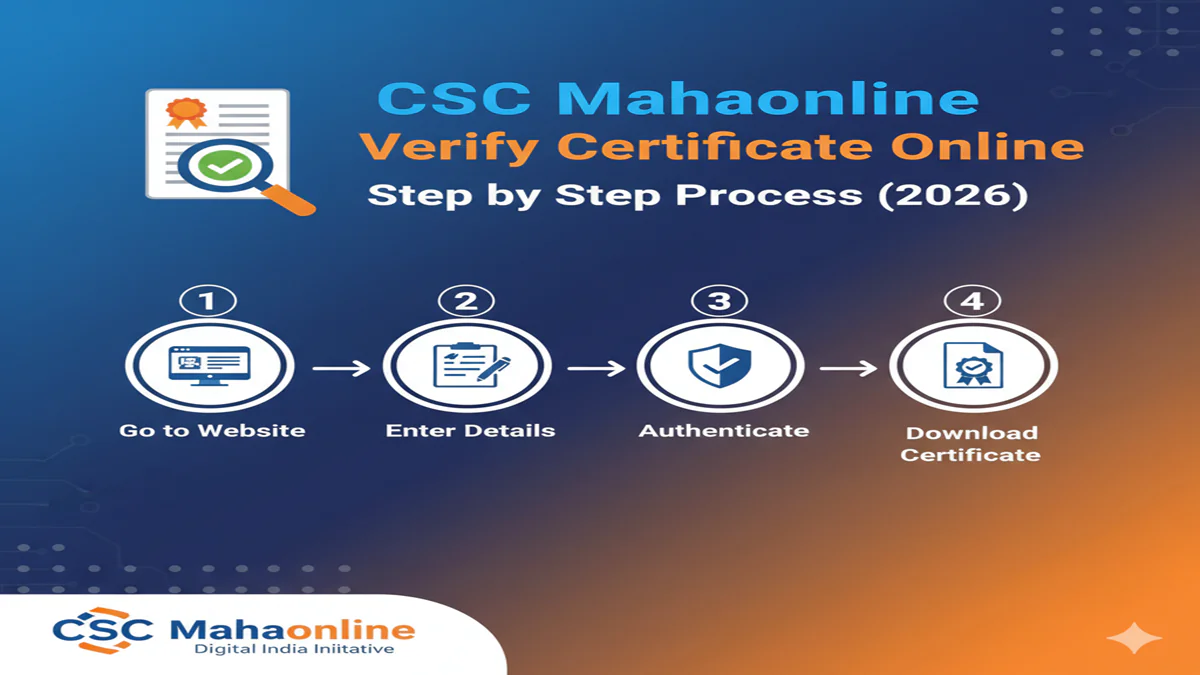
CSC Mahaonline Verify Certificate: महाऑनलाइन डिजिटल प्रमाणपत्राची पडताळणी कशी करावी? जाणून घ्या सोपी पद्धत!
CSC Mahaonline Verify Certificate: आजच्या डिजिटल युगात महाराष्ट्र सरकारने सर्व सेवा ‘आपले सरकार’ आणि ‘महाऑनलाइन’ (Mahaonline) पोर्टलद्वारे ऑनलाईन उपलब्ध करून दिल्या आहेत. आता जातीचा दाखला असो किंवा उत्पन्नाचा, सर्व दाखले डिजिटल स्वाक्षरीसह (Digital Signature) मिळतात. परंतु, अनेक ठिकाणी हे दाखले सादर करताना त्यांची सत्यता पडताळणे आवश्यक असते.
जर तुम्ही CSC केंद्रचालक असाल किंवा सामान्य नागरिक, तुम्हाला CSC Mahaonline Verify Certificate ची प्रक्रिया माहिती असणे गरजेचे आहे. या लेखामध्ये आपण कोणत्याही महाऑनलाइन प्रमाणपत्राची पडताळणी कशी करायची, याबद्दल सविस्तर माहिती घेणार आहोत.
प्रमाणपत्र पडताळणी (Verification) का आवश्यक आहे?
CSC Mahaonline Verify Certificate: सरकारी कामे, बँक कर्ज किंवा शैक्षणिक प्रवेशासाठी जेव्हा आपण डिजिटल दाखला जोडतो, तेव्हा तो अधिकृत आहे की नाही हे तपासण्यासाठी ‘व्हेरिफिकेशन’ केले जाते. डिजिटल दाखल्यावर हाताने केलेली सही नसते, तर एक Barcode आणि 15 अंकी पडताळणी क्रमांक असतो. या क्रमांकावरूनच दाखल्याची सत्यता सिद्ध होते.
CSC Mahaonline Certificate Verify करण्याची प्रक्रिया
CSC Mahaonline Verify Certificate: तुम्ही खालील स्टेप्स फॉलो करून तुमचे प्रमाणपत्र पडताळू शकता:
Step 1: अधिकृत पोर्टलला भेट द्या
सर्वात आधी महाऑनलाइनच्या अधिकृत पडताळणी लिंकवर किंवा ‘आपले सरकार’ पोर्टलवर (aaplesarkar.mahaonline.gov.in) जा. तिथे तुम्हाला ‘Verify Certificate’ किंवा ‘Track Your Application’ चा पर्याय दिसेल.
Step 2: पडताळणी क्रमांक (Application ID) टाका
तुमच्या प्रमाणपत्राच्या डाव्या बाजूला किंवा तळाला १५ अंकी Application ID / Certificate Number दिलेला असतो. तो नंबर अचूक बॉक्समध्ये टाईप करा.
Step 3: कॅप्चा (Captcha) कोड भरा
सुरक्षेसाठी दिलेला कॅप्चा कोड जसा आहे तसा भरा आणि ‘Go’ किंवा ‘Verify’ बटणावर क्लिक करा.
Step 4: माहिती तपासा
CSC Mahaonline Verify Certificate: बटणावर क्लिक केल्यानंतर स्क्रीनवर प्रमाणपत्राची मूळ माहिती (जसे की अर्जदाराचे नाव, दाखल्याचा प्रकार, जारी केल्याची तारीख) दिसेल. जर ही माहिती तुमच्या हातातील दाखल्याशी जुळत असेल, तर तुमचा दाखला खरा आहे.
[Image Suggestion: Screenshot of Mahaonline verification page with 15-digit ID box highlighted]
डिजिटल स्वाक्षरी (Digital Signature) कशी व्हॅलिडेट करावी?
CSC Mahaonline Verify Certificate: अनेकदा डिजिटल दाखल्यावर प्रश्नचिन्ह (?) दिसते. ते ‘Verified’ करण्यासाठी:
- तो दाखला Adobe Acrobat Reader मध्ये उघडा.
- त्या प्रश्नचिन्हावर क्लिक करा.
- ‘Signature Properties’ मध्ये जाऊन ‘Show Signer’s Certificate’ निवडा.
- ‘Trust’ टॅबमध्ये जाऊन ‘Add to Trusted Certificates’ करा आणि ओके (OK) दाबा. यामुळे ‘?’ च्या जागी हिरवी टिक (Green Tick) दिसेल.
नेहमी विचारले जाणारे प्रश्न (FAQs)
१. १५ अंकी क्रमांक चुकीचा दाखवत असेल तर काय करावे?
क्रमांक पुन्हा एकदा तपासा. जर तरीही चुकीचा दाखवत असेल, तर ज्या केंद्रातून दाखला काढला आहे तिथे संपर्क साधा किंवा पोर्टलच्या हेल्पलाईनला कळवा.
२. मोबाईलवरून प्रमाणपत्र पडताळता येते का?
हो, तुम्ही कोणत्याही स्मार्टफोनवरील ब्राउझरमध्ये महाऑनलाइनची वेबसाईट उघडून ही प्रक्रिया करू शकता.
३. बारकोड स्कॅन करून पडताळणी होते का?
हो, बहुतेक नवीन प्रमाणपत्रांवर QR कोड असतो. तो स्कॅन केल्यास तुम्हाला थेट व्हेरिफिकेशन पेजवर नेले जाते.
निष्कर्ष (Conclusion)
CSC Mahaonline Verify Certificate ही प्रक्रिया अत्यंत सोपी आणि पारदर्शक आहे. फसवणूक टाळण्यासाठी आणि दाखल्याची अधिकृतता जपण्यासाठी ही पडताळणी करणे नेहमीच हिताचे ठरते. जर तुमचा दाखला ऑनलाईन दिसत नसेल, तर तो अधिकृत मानला जात नाही, याची नोंद घ्यावी.
Quick Links Table
| सेवा (Service) | पोर्टल (Portal) |
| प्रमाणपत्र पडताळणी | Mahaonline Verify |
| अर्ज ट्रॅकिंग | Track Application Status |
| हेल्पलाईन क्रमांक | १८०० १२० ८०४० |
CSC MahaOnline Verify Certificate Online – Complete Step-by-Step Process (2026)
Introduction: The Digital Empowerment Initiative
CSC Mahaonline Verify Certificate: In the digital age, verifying the authenticity of certificates is paramount, especially those issued by government-backed platforms. The Common Service Centre (CSC) scheme, under the Digital India initiative, has revolutionized service delivery in rural and urban India. CSC MahaOnline, particularly prominent in Maharashtra, is a specialized portal facilitating various government-to-citizen (G2C) and business-to-citizen (B2C) services. A critical component of this ecosystem is the digital certificate—for courses, entitlements, registrations, and more.
As we advance into 2026, the process of verifying these certificates online has become more streamlined, secure, and user-centric. This comprehensive guide details the complete step-by-step process for verifying a CSC MahaOnline certificate online, incorporating the latest technological upgrades and security protocols implemented by 2026.
Part 1: Understanding CSC MahaOnline and Its Certificate Ecosystem
The Role of CSC and MahaOnline:
CSC Mahaonline Verify Certificate: Common Service Centres (CSCs) are physical front-end delivery points for government, financial, social, and digital services. They are the access points for delivering essential public utility services, social welfare schemes, healthcare, financial, education, and agriculture services, especially in remote villages. MahaOnline is a joint venture of the Government of Maharashtra and Tata Consultancy Services (TCS) that has developed and manages the ICT infrastructure for the state. The CSC MahaOnline portal integrates CSCs with this robust backend, enabling seamless service delivery.
Types of Certificates Issued:
Certificates generated through this ecosystem can vary widely:
- Skill Training Certificates: From courses conducted under PMKVY (Pradhan Mantri Kaushal Vikas Yojana) or state skill missions.
- E-District Certificates: Income, domicile, caste, birth, and death certificates.
- Agriculture and Land Certificates: Farmer identity cards, land record certificates (7/12, 8A).
- Entrepreneurship Course Completions: From programs like Digital Saksharta or Financially Literacy.
- Service Delivery Acknowledgment Certificates: For applications processed through the portal.
The Imperative for Online Verification:
CSC Mahaonline Verify Certificate: With the proliferation of digital documents, the risk of forgery has increased. Online verification serves as a critical tool for:
- Employers: Validating candidate credentials.
- Educational Institutions: Authenticating prior learning.
- Government Departments: Ensuring scheme benefits reach eligible, verified beneficiaries.
- Citizens: Providing a self-verification mechanism for their own documents.
Part 2: The Step-by-Step Verification Process (2026)
CSC Mahaonline Verify Certificate: As of 2026, the verification process has been significantly enhanced with a unified portal, AI-based document scanning, and blockchain-backed security for high-value certificates.
Prerequisites for Verification:
- A digital copy of the certificate (PDF/Image) or the Certificate/Acknowledgement Number.
- The Certificate ID or Application Reference Number.
- Basic details like the candidate’s name (as on certificate) and date of issuance.
Step-by-Step Walkthrough:
Step 1: Access the Official Verification Portal
CSC Mahaonline Verify Certificate: Do not rely on third-party links. Navigate to the primary CSC MahaOnline verification portal. As of 2026, the dedicated URL is likely to be a subdomain likeverify.cscmahaaonline.inor a dedicated section on the main MahaOnline website. Bookmark this official page for future use.
Step 2: Select the Certificate Type
CSC Mahaonline Verify Certificate: The portal will present a dropdown menu with various certificate categories (e.g., “Skill Certificate,” “E-District Certificate,” “Land Record,” “CSC Course Completion”). Selecting the correct type is crucial as it directs your query to the relevant verification database.
Step 3: Enter Verification Credentials
CSC Mahaonline Verify Certificate: Input the required details. The system in 2026 primarily uses two methods:
- Method A: Using Certificate Details
- Certificate Unique ID: A 12-16 digit alphanumeric number prominently displayed on the certificate.
- Full Name: Enter exactly as it appears on the certificate.
- Date of Birth/Date of Issue: As per the portal’s prompt.
- Method B: Using Document Upload (AI-Assisted)
- This is a 2026 enhancement. Click “Upload Certificate.”
- Drag and drop or browse to upload a clear scan/photo of the certificate.
- The portal’s AI-powered Optical Character Recognition (OCR) engine will automatically extract the Certificate ID, name, and other details, populating the form for you. You simply need to confirm.
Step 4: Complete the Security Check
CSC Mahaonline Verify Certificate: A CAPTCHA (advanced, often interactive in 2026) or a One-Time Password (OTP) sent to the mobile number registered with the certificate will be used for a two-factor authentication layer. This ensures that verification is a conscious, authorized activity.
Step 5: Submit and Generate Verification Report
CSC Mahaonline Verify Certificate: Click the “Verify” or “Submit” button. The system will query the central, secure database and return aVerification Reportwithin seconds.
Step 6: Interpret the Verification Result
CSC Mahaonline Verify Certificate: The report will be clear and unambiguous:
- VALID: The certificate exists in the official records. The report will display a green tick, the certificate details, and a Verification Timestamp. For high-security certificates, a dynamic QR code will be present that, when scanned with a official app, shows a live “valid” status.
- INVALID/NOT FOUND: A red warning will indicate the certificate number is not recognized. This could mean a forgery, an expired certificate, or an error in the entered number.
- ADDITIONAL STATUSES (2026 Features):
- EXPIRED: For certificates with a validity period (e.g., certain training certificates).
- REVOKED: Indicates the issuing authority has legally cancelled the certificate.
- VERIFICATION AUDIT TRAIL: Advanced users (like government departments) can access a limited, privacy-protected log of when the certificate was previously verified.
Step 7: Download/Save the Verification Slip
CSC Mahaonline Verify Certificate: The portal allows you to download a PDF verification slip. This slip has its own unique watermark and a reference number. It serves as legal proof that you verified the certificate on a specific date and time.
Part 3: Troubleshooting Common Issues in 2026
CSC Mahaonline Verify Certificate: Despite a streamlined process, users may encounter hurdles. Here are the 2026 solutions:
- “Certificate Not Found” Error:
- Solution: Double-check for typos. Use the upload feature for accuracy. Contact the CSC where the certificate was issued. They can provide the correct ID or check its status in their Village Level Entrepreneur (VLE) portal.
- OTP Not Received:
- Solution: Ensure your registered mobile number is active. Use the “Resend OTP” option. Check the SMS spam folder. If the number has changed, you must contact CSC support with proof of identity to update records.
- Blurry or Unreadable Upload:
- Solution: The portal’s AI will prompt you for a clearer image. Ensure good lighting, place the certificate on a dark background, and avoid glare. Use a dedicated scanner app on your smartphone.
- Portal Down or Slow:
- Solution: The 2026 infrastructure boasts high uptime. Check your internet connection. Clear your browser cache or try a different browser (Chrome, Edge, Firefox).
- Certificate Details Mismatch:
- Solution: If the name or other details do not match exactly (e.g., middle name missing), the verification may fail. Use the exact spelling and order from the certificate. For legal name changes, you may need a linked certificate or must contact support.
Part 4: The Technology Backbone: What’s New in 2026?
CSC Mahaonline Verify Certificate: The verification process is powered by cutting-edge technology:
- Blockchain Integration: Critical certificates (land records, high-value skill certifications) have their hash stored on a permissioned blockchain. The verification report confirms the certificate’s integrity by matching its current hash with the one on the blockchain, making tampering virtually impossible.
- Advanced AI & OCR: Ensures high accuracy in data extraction from uploaded certificates, reducing manual entry errors.
- Unified Database Architecture: All certificates issued across Maharashtra’s CSCs are logged in a consolidated, real-time database, eliminating data silos and delays.
- ISO-Compliant Digital Signatures: Certificates are signed using upgraded, quantum-resistant digital signatures, ensuring long-term legal validity.
Part 5: Security and Privacy Considerations
- Data Privacy: The verification portal complies with the India Digital Personal Data Protection Act (DPDPA), 2023. It only discloses whether a certificate is valid, not the underlying personal data used to generate it, without explicit consent.
- Avoiding Scams: Never share your Certificate ID or personal details on unofficial websites or via email. Only use the official portal. Legitimate verification will never ask for money.
- Secure Your Certificate: Treat your digital certificate like a physical one. Store it securely. When sharing, use password-protected PDFs.
Conclusion: A Trustworthy Digital Future
CSC Mahaonline Verify Certificate: The CSC MahaOnline certificate verification process in 2026 represents a mature, secure, and citizen-friendly system. It upholds the integrity of the vast digital certificate ecosystem built over the past decade. By following the outlined steps, any stakeholder—a job seeker, a farmer, a student, or an official—can instantly and reliably authenticate a document, fostering trust and efficiency in digital transactions. This system is a cornerstone of a transparent, digitally empowered society, ensuring that every certified achievement and entitlement is recognized and respected.
Frequently Asked Questions (FAQs) – CSC MahaOnline Certificate Verification (2026)
Q1: Is there a fee for verifying a CSC MahaOnline certificate online?
A:CSC Mahaonline Verify Certificate: No. The online verification service on the official CSC MahaOnline portal is completely free of charge for any user—citizens, employers, or institutions. If any third-party website or individual asks for payment for verification, it is a scam. Always use the official, free portal.
Q2: My certificate is several years old (pre-2023). Can it still be verified online?
A:In most cases, yes. Since the digitalization drive, most certificates issued through the CSC network have been migrated to the central database. However, for very old certificates, if you encounter a “Not Found” error, please visit the originating CSC centre. The Village Level Entrepreneur (VLE) can assist in locating the record or initiating a re-issuance process for a digital copy that can be verified.
Q3: What is the difference between the Certificate ID and the Application Reference Number? Which one should I use?
A:TheCertificate ID(or Certificate Number) is a unique identifier printed on the final issued certificate. TheApplication Reference Numberis generated when the service is first applied for. For verification, always use theCertificate IDif you have the certificate in hand. The Application Number is useful for tracking the application status before the certificate is generated. The 2026 portal’s upload feature eliminates this confusion by auto-reading the correct ID.
Q4: The verification result says “Valid,” but the employer says they need a “live” verification link. What does this mean?
A:For enhanced security, many high-stakes certificates in 2026 feature adynamic QR code. Instead of a static PDF, which could be forged, this QR code, when scanned with an official verifier app, leads to a live portal page showing the current validity status. This is a real-time, tamper-proof confirmation. You can direct the employer to scan the QR code on your certificate or provide them with the Certificate ID to check on the public portal themselves.
Q5: I verified a certificate last month, but now it shows as “Revoked.” What happened and what should I do?
A:A “Revoked” status means the issuing authority has officially cancelled the certificate after its initial issuance. This can happen due to the discovery of fraudulent information in the application, administrative errors, or legal directives. If you believe this is a mistake, or you are a holder of such a certificate, you mustimmediately contact the helpdesk of the issuing department(e.g., the Skill Development Department for a PMKVY certificate) or the CSC SPV (State Project Office) for Maharashtra. They will provide the specific reason and guide you on the grievance redressal process.