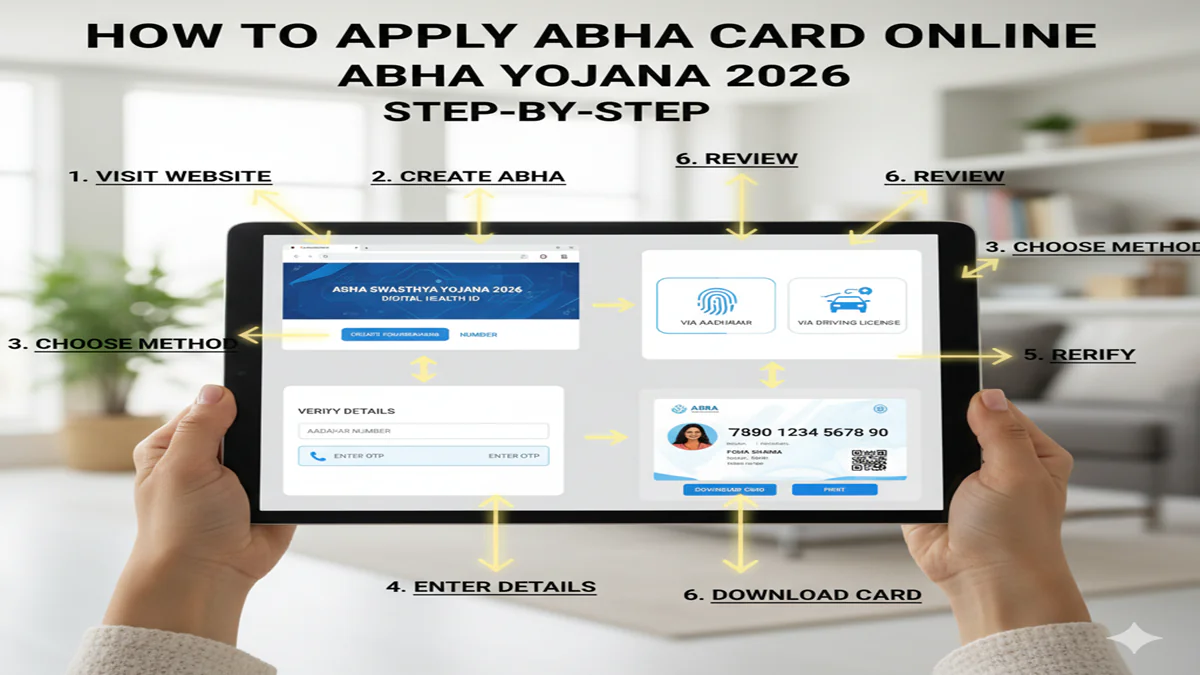
Apply ABHA Card Online 2026: आभा कार्ड क्या है? स्टेप-बाय-स्टेप ऑनलाइन आवेदन प्रक्रिया और इसके बेमिसाल फायदे!
Apply ABHA Card Online Step by Step 2026: Introduction: आज के डिजिटल युग में भारत सरकार स्वास्थ्य सेवाओं को भी हाई-टेक बना रही है। इसी दिशा में ABHA Card (Ayushman Bharat Health Account) एक क्रांतिकारी कदम है। साल 2026 तक सरकार का लक्ष्य हर नागरिक को एक ‘डिजिटल हेल्थ आईडी’ प्रदान करना है। इस कार्ड की मदद से आपके स्वास्थ्य से जुड़ी सभी जानकारियां जैसे—डॉक्टर की पर्ची, लैब रिपोर्ट और बीमारियों का इतिहास—एक ही जगह सुरक्षित रहते हैं।
अगर आपने अभी तक अपना आभा कार्ड नहीं बनाया है, तो यह लेख आपके लिए है। आज हम Apply ABHA Card Online Step by Step की पूरी जानकारी देंगे ताकि आप बिना किसी परेशानी के अपना कार्ड खुद बना सकें।
1. आभा कार्ड क्या है? (What is ABHA Card?)
Apply ABHA Card Online Step by Step 2026: आभा कार्ड 14 अंकों का एक यूनिक हेल्थ नंबर होता है। यह एक डिजिटल लॉकर की तरह काम करता है जहाँ आपके सभी मेडिकल रिकॉर्ड्स ऑनलाइन सेव रहते हैं। आपको इलाज के लिए भारी-भरकम फाइलें ढोने की जरूरत नहीं पड़ती; डॉक्टर सिर्फ आपके कार्ड नंबर से आपकी मेडिकल हिस्ट्री देख सकते हैं।
2. जरूरी दस्तावेज (Requirements)
Apply ABHA Card Online Step by Step 2026: आभा कार्ड बनाने के लिए आपको बहुत कम चीजों की जरूरत होती है:
- आधार कार्ड (सबसे जरूरी)।
- आधार से लिंक मोबाइल नंबर (OTP वेरिफिकेशन के लिए)।
- यदि आधार नहीं है, तो आप ड्राइविंग लाइसेंस का उपयोग भी कर सकते हैं।
3. ABHA Card ऑनलाइन बनाने की स्टेप-बाय-स्टेप प्रक्रिया (Process)
स्टेप 1: आधिकारिक वेबसाइट पर जाएं सबसे पहले अपने ब्राउज़र में healthid.ndhm.gov.in या abdm.gov.in ओपन करें।
स्टेप 2: ‘Create ABHA Number’ पर क्लिक करें होमपेज पर आपको ‘Create ABHA Number’ का विकल्प दिखेगा, उस पर क्लिक करें।
स्टेप 3: आधार कार्ड विकल्प चुनें यहाँ आपको ‘Using Aadhaar’ का विकल्प चुनना होगा और ‘Next’ पर क्लिक करना होगा।
स्टेप 4: आधार नंबर और सहमति (Consent) अपना 12 अंकों का आधार नंबर दर्ज करें। नीचे दिए गए ‘I Agree’ बॉक्स को चेक करें और कैप्चा (Captcha) कोड भरकर ‘Next’ दबाएं।
स्टेप 5: OTP वेरिफिकेशन आपके आधार से लिंक मोबाइल नंबर पर 6 अंकों का OTP आएगा। उसे बॉक्स में भरें और ‘Verify’ करें।
स्टेप 6: विवरण की जांच करें स्क्रीन पर आपका नाम, फोटो और जन्म तिथि दिखाई देगी (जो आधार से ली गई है)। जानकारी सही होने पर ‘Next’ करें।
स्टेप 7: ABHA एड्रेस बनाएं जैसे आपका ईमेल आईडी होता है, वैसे ही आपको एक ‘ABHA Address’ (जैसे: name@abdm) बनाना होगा।
स्टेप 8: आभा कार्ड डाउनलोड करें प्रक्रिया पूरी होते ही आपका 14 अंकों वाला आभा कार्ड स्क्रीन पर आ जाएगा। ‘Download ABHA Card’ पर क्लिक करके इसकी PDF सेव कर लें।
4. आभा कार्ड के 5 सबसे बड़े फायदे (Benefits)
- कागजों से छुटकारा: अब डॉक्टर के पास पुरानी रिपोर्ट्स की फाइल ले जाने की जरूरत नहीं।
- पूरे भारत में मान्य: यह कार्ड देश के सभी सरकारी और प्राइवेट अस्पतालों में मान्य है।
- सुरक्षित डेटा: आपकी मेडिकल जानकारी पूरी तरह सुरक्षित है। बिना आपकी अनुमति (OTP) के कोई इसे नहीं देख सकता।
- बेहतर इलाज: डॉक्टर आपकी पिछली रिपोर्ट्स देखकर सटीक और बेहतर इलाज कर पाते हैं।
- सरकारी योजनाओं का लाभ: आयुष्मान भारत जैसी योजनाओं का लाभ उठाने में यह कार्ड बहुत मददगार है।
5. अक्सर पूछे जाने वाले 5 प्रश्न (FAQs)
प्रश्न 1: आभा कार्ड बनाने की फीस कितनी है?
उत्तर: यह सेवा भारत सरकार द्वारा पूरी तरह मुफ्त (Free) प्रदान की जाती है।
प्रश्न 2: क्या बच्चे भी आभा कार्ड बनवा सकते हैं?
उत्तर: हाँ, बच्चों के आधार कार्ड के माध्यम से उनके माता-पिता उनका आभा कार्ड बनवा सकते हैं।
प्रश्न 3: क्या इसके लिए अस्पताल जाना जरूरी है?
उत्तर: नहीं, आप इसे घर बैठे अपने स्मार्टफोन या लैपटॉप से ऑनलाइन बना सकते हैं।
प्रश्न 4: अगर मेरा मोबाइल नंबर आधार से लिंक नहीं है तो क्या करूँ? उत्तर
: ऐसी स्थिति में आप अपने नजदीकी सरकारी अस्पताल या जन सेवा केंद्र (CSC) जाकर बायोमेट्रिक (अंगूठे के निशान) के जरिए कार्ड बनवा सकते हैं।
प्रश्न 5: आभा कार्ड और आयुष्मान कार्ड एक ही हैं?
उत्तर: नहीं, आभा कार्ड आपकी ‘हेल्थ आईडी’ है, जबकि आयुष्मान कार्ड 5 लाख रुपये तक के मुफ्त इलाज के लिए एक ‘बीमा कार्ड’ है।
Conclusion: स्वास्थ्य के क्षेत्र में डिजिटल क्रांति!
Apply ABHA Card Online Step by Step प्रक्रिया को अपनाकर आप अपने परिवार के स्वास्थ्य को डिजिटल सुरक्षा दे सकते हैं। 2026 की आधुनिक स्वास्थ्य सेवाओं का लाभ उठाने के लिए आज ही अपना आभा कार्ड बनाएं।
How to Apply for an ABHA Card Online: A Complete Step-by-Step Guide for 2026
Introduction: What is ABHA and Why It Matters in 2026
Apply ABHA Card Online Step by Step 2026: In today’s digital healthcare landscape, having a unified health identity has become increasingly crucial. The Ayushman Bharat Health Account (ABHA) – formerly known as the Health ID – represents a transformative initiative by the Government of India to create a seamless, integrated healthcare ecosystem. As we enter 2026, the ABHA card has evolved from an optional convenience to a fundamental component of India’s digital healthcare infrastructure.
The ABHA card provides every Indian citizen with a unique 14-digit identification number that consolidates their medical records across hospitals, clinics, diagnostic centers, and pharmacies. This digital health ecosystem enables secure storage and sharing of health information with authorized healthcare providers, eliminating the need for carrying physical medical records and ensuring continuity of care.
In this comprehensive guide, we’ll walk you through the entire process of applying for an ABHA card online, highlighting the updated procedures and features available in 2026, along with addressing common concerns and questions about privacy, security, and benefits.
Understanding the ABHA Ecosystem in 2026
Apply ABHA Card Online Step by Step 2026: Before diving into the application process, it’s essential to understand what the ABHA system offers in its current iteration:
Key Components:
- ABHA Number: Your unique 14-digit health identifier
- ABHA Address: Your chosen username for the health records system (typically yourname@abdm)
- Personal Health Records (PHR): A digital repository of your medical history
- Health Information Provider/User Applications: Authorized apps and platforms that can access your health data with your consent
Enhanced Features in 2026:
- Integration with National Digital Health Mission (NDHM) expanded services
- AI-powered health insights based on your medical history
- Telemedicine consultation history tracking
- Vaccination and immunization records
- Insurance claim processing integration
- Emergency access features for critical situations
Eligibility Criteria for ABHA Card Application
Apply ABHA Card Online Step by Step 2026: The ABHA initiative is designed to be inclusive and accessible to all Indian residents:
- Citizenship: All Indian citizens, including minors (with parental consent)
- Age: No minimum or maximum age limit
- Documents Required: Basic KYC documents (Aadhaar, PAN, or driving license)
- Special Cases: Applications can be created for dependents, elderly family members, or persons with disabilities by their caregivers
Pre-Application Checklist
Apply ABHA Card Online Step by Step 2026: Before beginning your ABHA card application, ensure you have the following ready:
- Valid Mobile Number: Registered in your name and active
- Email Address: For communication and verification
- Identity Proof: Aadhaar card (most convenient), PAN card, or driving license
- Recent Photograph: Digital copy (JPEG/PNG format, under 2MB)
- Stable Internet Connection: For seamless application process
Step-by-Step Guide to Apply for ABHA Card Online (2026 Edition)
Step 1: Accessing the Official Portal
- Visit the official ABHA portal: abha.abdm.gov.in
- Alternatively, download the official “ABHA” app from Google Play Store or Apple App Store
- You may also access the service through partner applications like the Aarogya Setu app, participating bank apps, or healthcare provider portals that have integrated ABHA services
Note: Be cautious of fraudulent websites. Always verify you’re on the official government portal by checking for the “gov.in” domain and security certificate.
Step 2: Registration Process
Option A: Using Aadhaar (Most Common Method)
- Click on “Create ABHA Number” on the homepage
- Select “Using Aadhaar” as your verification method
- Enter your 12-digit Aadhaar number
- Consent to share your details with the ABDM (Ayushman Bharat Digital Mission)
- Enter the OTP to verify your identity
- Your basic details (name, date of birth, gender) will be auto-filled from the Aadhaar database
- Review the information and make corrections if necessary (some fields may be editable)
- Create your ABHA address (this will be your digital health username)
Option B: Using Driving License
- Select “Using Driving License” if you don’t wish to use Aadhaar or don’t have one
- Enter your driving license number
- Upload a scanned copy/photo of your driving license
- Enter other required details manually
- Complete video-based verification (new feature in 2026)
- Receive verification OTP on your registered mobile number
Option C: Using PAN Card
- Similar to the driving license process but using PAN details
- Requires additional address proof submission
- May take slightly longer for verification
Step 3: Creating Your ABHA Address
Apply ABHA Card Online Step by Step 2026: This is a crucial step in your ABHA setup:
- Choose a unique ABHA address (format: username@abdm)
- This will serve as your digital health identity for sharing records
- Ensure it’s something memorable but secure
- The system will check for availability in real-time
- Consider using a combination of your name and numbers for security
Step 4: Setting Up Security Features
Apply ABHA Card Online Step by Step 2026: In 2026, ABHA has enhanced security options:
- Primary Authentication: Mobile OTP (default)
- Secondary Authentication Options:
- App-based biometric authentication
- Security questions
- Email verification backup
- Two-factor authentication with authenticator apps
- Consent Management Settings: Configure how and when your data can be accessed
- Emergency Access: Set up trusted contacts for emergency situations
- Data Sharing Preferences: Default settings for what information is shareable
Step 5: Downloading and Saving Your ABHA Card
Apply ABHA Card Online Step by Step 2026: Once your application is processed (typically instant or within a few hours):
- Download your digital ABHA card (PDF format)
- Save a copy on your device and cloud storage
- Print a physical copy if desired (laminated for durability)
- Add the ABHA card to digital wallets (Apple Wallet, Google Pay, etc.) – new feature in 2026
- Note down your ABHA number separately in a secure place
Step 6: Linking Health Records (Optional but Recommended)
Apply ABHA Card Online Step by Step 2026: To maximize the benefits of your ABHA:
- Visit a participating hospital, clinic, or diagnostic center
- Share your ABHA number/address
- Authorize them to access/upload your health records
- Alternatively, use the ABHA app to scan and upload historical records
- Set privacy levels for each type of record (lab reports, prescriptions, vaccination history, etc.)
Applying for Dependents and Family Members
Apply ABHA Card Online Step by Step 2026: The 2026 ABHA portal includes streamlined family management:
- For Minors:
- Parents/legal guardians can create ABHA for children under 18
- Requires guardian’s Aadhaar and child’s birth certificate
- Records transfer option when child turns 18
- For Elderly or Dependent Adults:
- Caregiver access can be configured
- Limited permissions based on requirements
- Emergency override settings
- Family Group Feature:
- Create a family group in your ABHA profile
- Manage consent for family members collectively
- View family health trends (aggregated, anonymous data)
Troubleshooting Common Application Issues
Apply ABHA Card Online Step by Step 2026: Despite improvements in 2026, some users may encounter issues:
Problem 1: Aadhaar Mobile Number Not Linked
- Solution: Update your mobile number in Aadhaar first via nearest enrollment center
- Alternative: Use driving license or PAN method
Problem 2: OTP Not Received
- Wait 2-3 minutes and request again
- Check spam folder for SMS
- Ensure mobile network is available
- Use “Call for OTP” option if available
Problem 3: Name Mismatch
- Minor variations are acceptable
- Apply ABHA Card Online Step by Step 2026: For significant mismatches, correct in Aadhaar first or use manual verification
Problem 4: Technical Errors During Application
- Clear browser cache and cookies
- Try a different browser (Chrome, Firefox recommended)
- Switch between website and mobile app
- Contact ABHA helpline: 1800-11-4477 / 14477
Post-Application: Maximizing Your ABHA Benefits
Apply ABHA Card Online Step by Step 2026: Once you have your ABHA card, here’s how to make the most of it:
- Complete Your Health Profile:
- Add blood group, allergies, chronic conditions
- List current medications
- Note emergency contacts
- Upload advance medical directives if any
- Explore Integrated Services:
- Book appointments through ABHA-linked hospitals
- Access telemedicine services
- Order medicines from integrated pharmacies
- Schedule lab tests with digital report delivery
- Participate in Health Programs:
- Government wellness initiatives
- Preventive health screenings
- Vaccination reminders and tracking
- Utilize Analytical Tools:
- Health trend analysis (available in 2026 version)
- Medication adherence tracking
- Personalized health recommendations
Privacy and Security in the ABHA System
Apply ABHA Card Online Step by Step 2026: Given the sensitivity of health data, ABHA 2026 incorporates robust privacy measures:
Your Rights:
- Complete Ownership: You own your health data
- Granular Consent: Decide exactly what to share, with whom, and for how long
- Access Logs: View complete history of who accessed your data
- Revocable Access: Withdraw consent anytime
- Data Portability: Download your complete health records
Security Features:
- End-to-end encryption of health data
- No central database of medical records (federated architecture)
- Regular security audits and compliance checks
- Anonymization for research purposes
Future Developments (Beyond 2026)
Apply ABHA Card Online Step by Step 2026: The ABHA ecosystem continues to evolve:
- International Portability: Discussions for cross-border health data standards
- IoT Integration: Wearable device data synchronization
- Genomic Data Inclusion: Optional genetic profile integration for personalized medicine
- Blockchain Trials: Pilot programs for enhanced security and transparency
Frequently Asked Questions (2026 Edition)
Q1: Is ABHA mandatory?
No, it remains voluntary but highly recommended for streamlined healthcare access.
Q2: Can I delete my ABHA if I change my mind?
Yes, you can deactivate or permanently delete your ABHA through the portal. There’s a 30-day cooling period before permanent deletion.
Q3: What if I lose my phone with ABHA app?
Immediately use another device to log in and revoke all sessions, then report to the ABHA helpline for additional security measures.
Q4: Are private hospitals required to accept ABHA?
While not mandatory, most major healthcare providers have integrated ABHA into their systems as part of the National Digital Health Mission.
Q5: How much does it cost?
ABHA registration and basic services remain completely free as a government initiative.
Q6: Can NRIs apply for ABHA?
Yes, with valid Indian identification documents. Special provisions exist for NRIs in the 2026 framework.
Conclusion: Embracing Digital Healthcare Transformation
The ABHA card represents more than just another digital ID—it’s a gateway to a transformed healthcare experience that puts you at the center of your health journey. As we progress through 2026, the system’s maturity offers unprecedented convenience, continuity, and personalization in healthcare management.
By following this step-by-step guide, you can seamlessly join millions of Indians who have already taken control of their health information. The process, refined over years of implementation, is now more user-friendly, secure, and feature-rich than ever before.
Remember, your health data is one of your most valuable personal assets. The ABHA system provides a secure, private, and efficient way to manage this asset while ensuring you receive coordinated, informed care whenever and wherever you need it.
Take the first step today toward a more organized, accessible, and empowered healthcare experience. Create your ABHA card and become an active participant in India’s digital health revolution.
Disclaimer: This guide is for informational purposes based on the ABHA system as of 2026. Always refer to the official ABDM portal for the most current procedures and policies.