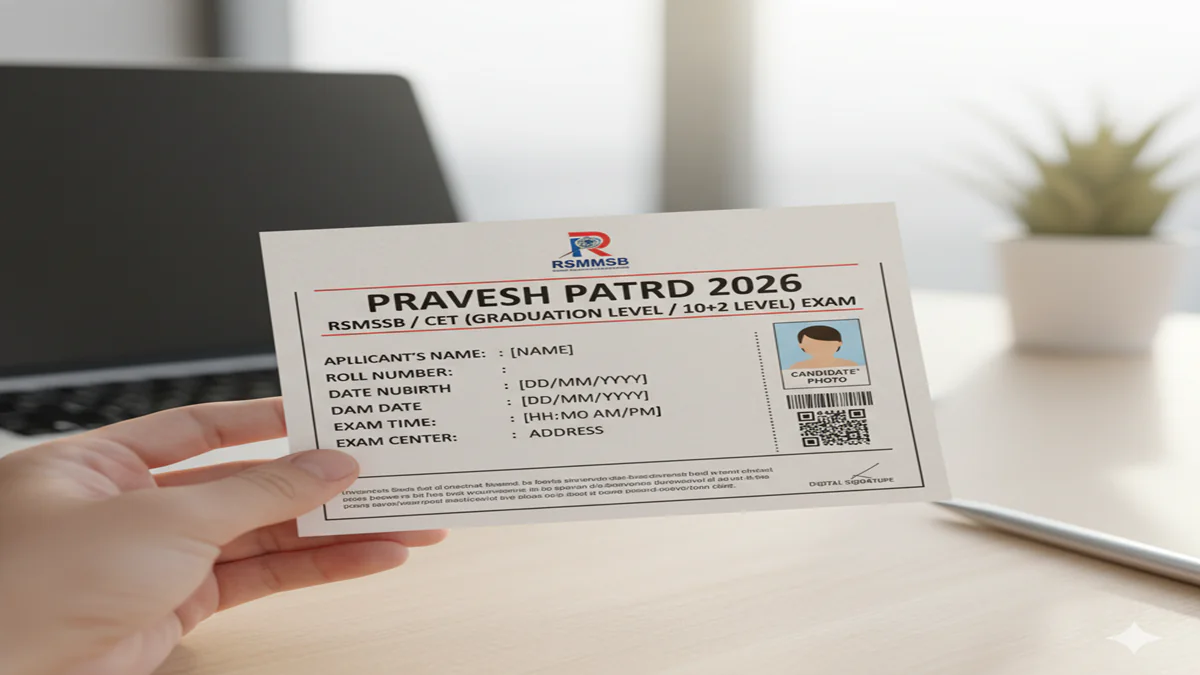
Rsmssb Admit Card 2026: राजस्थान कर्मचारी चयन बोर्ड एडमिट कार्ड कैसे डाउनलोड करें? जानें डायरेक्ट लिंक और परीक्षा के जरूरी नियम!
Introduction:
RSMSSB Admit Card 2026 Download Link: राजस्थान में सरकारी नौकरी की तैयारी कर रहे युवाओं के लिए राजस्थान कर्मचारी चयन बोर्ड (RSMSSB/RSSB) की परीक्षाएं बहुत महत्वपूर्ण होती हैं। चाहे वह पटवारी हो, एलडीसी (LDC) हो या जूनियर इंजीनियर, परीक्षा से पहले सबसे महत्वपूर्ण दस्तावेज आपका “RSMSSB Admit Card 2026” होता है। एडमिट कार्ड के बिना किसी भी अभ्यर्थी को परीक्षा हॉल में प्रवेश नहीं दिया जाता है।
साल 2026 की विभिन्न भर्तियों के लिए बोर्ड ने एडमिट कार्ड पोर्टल सक्रिय कर दिया है। इस लेख में हम आपको विस्तार से बताएंगे कि आप अपना एडमिट कार्ड पीडीएफ (PDF) फॉर्म में कैसे डाउनलोड कर सकते हैं, नाम के अनुसार रिजल्ट कैसे देखें और परीक्षा केंद्र पर आपको कौन से दस्तावेज साथ ले जाने होंगे।
1. RSMSSB Admit Card 2026: एक नज़र में (Overview)
| विभाग का नाम | राजस्थान कर्मचारी चयन बोर्ड (RSMSSB) |
| परीक्षा का नाम | विभिन्न भर्ती परीक्षाएं 2026 |
| एडमिट कार्ड जारी होने की तिथि | परीक्षा से 7-10 दिन पहले |
| डाउनलोड करने का तरीका | ऑनलाइन (SSO ID / आधिकारिक वेबसाइट) |
| आधिकारिक पोर्टल | rsmssb.rajasthan.gov.in |
2. एडमिट कार्ड डाउनलोड करने की स्टेप-बाय-स्टेप प्रक्रिया
RSMSSB Admit Card 2026 Download Link: अभ्यर्थी दो तरीकों से अपना प्रवेश पत्र प्राप्त कर सकते हैं:
विधि 1: आधिकारिक वेबसाइट के माध्यम से (Direct Link)
- सबसे पहले बोर्ड की आधिकारिक वेबसाइट
rsmssb.rajasthan.gov.inपर जाएं। - होमपेज पर दिए गए ‘Admit Card’ सेक्शन पर क्लिक करें।
- अब अपनी संबंधित परीक्षा (जैसे—LDC 2026) के लिंक का चयन करें।
- ‘Get Admit Card’ के विकल्प पर क्लिक करें।
- अपना Application Number और Date of Birth दर्ज करें।
- स्क्रीन पर दिख रहा कैप्चा कोड भरें और सबमिट करें। आपका एडमिट कार्ड पीडीएफ फॉर्मेट में खुल जाएगा।
विधि 2: SSO ID पोर्टल के माध्यम से (सबसे आसान)
- राजस्थान एसएसओ पोर्टल
sso.rajasthan.gov.inपर जाएं। - अपनी SSO ID और पासवर्ड से लॉगिन करें।
- ‘Recruitment Portal’ ऐप पर क्लिक करें।
- ऊपर दिए गए मेनू में ‘Get Admit Card’ के लिंक पर जाएं।
- आपके द्वारा भरी गई सभी भर्तियों के एडमिट कार्ड यहाँ दिखेंगे, ‘Download’ पर क्लिक करें।
3. एडमिट कार्ड में दी गई जानकारी की जांच करें
RSMSSB Admit Card 2026 Download Link: डाउनलोड करने के बाद, सुनिश्चित करें कि आपके एडमिट कार्ड पर निम्नलिखित जानकारी सही है:
- नाम और फोटो: आपका नाम सही स्पेलिंग के साथ होना चाहिए और फोटो स्पष्ट होनी चाहिए।
- परीक्षा केंद्र (Exam Center): केंद्र का नाम और कोड ध्यान से पढ़ें।
- रिपोर्टिंग टाइम: गेट बंद होने के समय से कम से कम 1 घंटा पहले पहुंचना अनिवार्य है।
- महत्वपूर्ण निर्देश: एडमिट कार्ड के नीचे दिए गए नियमों को जरूर पढ़ें।
4. परीक्षा केंद्र पर साथ ले जाने वाले जरूरी दस्तावेज (Important Checklist)
RSMSSB Admit Card 2026 Download Link: बोर्ड के नियमों के अनुसार, आपको परीक्षा केंद्र पर निम्नलिखित चीजें साथ ले जानी होंगी:
- एडमिट कार्ड का प्रिंट आउट: साफ और स्पष्ट प्रिंट।
- मूल पहचान पत्र (Original ID Proof): आधार कार्ड, वोटर आईडी या ड्राइविंग लाइसेंस।
- पासपोर्ट साइज फोटो: नवीनतम रंगीन फोटो (एडमिट कार्ड पर चिपकाने के लिए)।
- नीला पारदर्शी पेन: केवल पारदर्शी (Transparent) पेन ही मान्य होगा।
4. अक्सर पूछे जाने वाले प्रश्न (FAQs)
Q1: क्या मैं नाम के अनुसार (Name Wise) एडमिट कार्ड डाउनलोड कर सकता हूँ?
Ans: आधिकारिक वेबसाइट पर एप्लीकेशन नंबर जरूरी है, लेकिन एसएसओ आईडी (SSO ID) के जरिए आप बिना एप्लीकेशन नंबर के भी अपना एडमिट कार्ड देख सकते हैं।
Q2: यदि वेबसाइट सर्वर डाउन है तो क्या करें?
Ans: परीक्षा से 2-3 दिन पहले भारी ट्रैफिक के कारण वेबसाइट स्लो हो सकती है। ऐसे में देर रात या सुबह जल्दी ट्राई करें या सीधे SSO पोर्टल का उपयोग करें।
Q3: क्या एडमिट कार्ड का रंगीन प्रिंट जरूरी है?
Ans: नहीं, ब्लैक एंड व्हाइट प्रिंट भी मान्य है, लेकिन फोटो और अक्षर साफ दिखने चाहिए।
Conclusion: सफलता के लिए तैयार रहें!
RSMSSB Admit Card 2026 डाउनलोड करना आपकी परीक्षा की सफलता की ओर पहला कदम है। अंतिम समय की भीड़ और तकनीकी समस्याओं से बचने के लिए इसे समय रहते डाउनलोड कर लें। याद रखें, परीक्षा केंद्र पर शांति बनाए रखें और सभी नियमों का पालन करें।
RSMSSB Admit Card 2026: Your Ultimate Guide to Download, Key Details, and Exam Day Rules
Rsmssb Admit Card 2026 The Rajasthan Staff Selection Board (RSMSSB) is the gateway to numerous prestigious state government posts, from Junior Engineer and Patwari to Laboratory Assistant and Agriculture Supervisor. As the 2026 recruitment cycle gains momentum, the issuance of the RSMSSB Admit Card 2026 becomes the most critical document for every candidate. This hall ticket is not just an entry ticket; it is a verified identity proof and a document containing vital exam details.
This exhaustive guide is designed to be your one-stop resource for everything related to the RSMSSB Admit Card 2026. We will walk you through the download process, decode the information on it, list mandatory items to carry, and outline the strict exam day protocols you must follow.
Understanding the Importance of the RSMSSB Admit Card
RSMSSB Admit Card 2026 Download Link: The RSMSSB Admit Card, officially called the “प्रवेश पत्र” (Pravesh Patra), is a mandatory document issued by the Rajasthan Staff Selection Board. It serves multiple official purposes:
- Proof of Candidature: It verifies that you have successfully applied for the examination and have been allotted an exam center.
- Identity Verification: Your photograph, signature, and other details on the admit card are cross-checked with your photo ID at the exam center.
- Information Repository: It contains all essential information about your exam: date, time, venue, and important instructions.
- Security Measure: Unique codes like Roll Number and Application Number help in maintaining the integrity and organization of the examination process.
Without a valid, printed copy of the RSMSSB Admit Card 2026, you will be categorically denied entry into the examination hall. No digital or soft copy on a mobile phone is permitted.
Section 1: Step-by-Step Guide to Download Your RSMSSB Admit Card 2026
RSMSSB Admit Card 2026 Download Link: The admit card is typically released10 to 15 days before the scheduled examination date. Candidates must proactively download it from the official website. Follow these steps meticulously:
Step 1: Visit the Official Website
Navigate to the official RSMSSB portal: https://rsmssb.rajasthan.gov.in. Avoid third-party websites to prevent phishing attacks or misinformation.
Step 2: Locate the Admit Card Link
On the homepage, under the “Latest News” or “Notices” section, look for a link titled “RSMSSB [Post Name] Exam 2026 Admit Card” or “प्रवेश पत्र डाउनलोड करें.”
Step 3: Enter Required Credentials
You will be redirected to a login page. You will need to enter any combination of the following details (as specified in the notice):
- Application ID/Registration Number
- Date of Birth (DD/MM/YYYY)
- Password
Step 4: Download and Verify
After logging in, your RSMSSB Admit Card 2026 will be displayed on the screen. Carefully check every single detail for any discrepancy:
- Candidate’s Name
- Father’s/Mother’s Name
- Photograph and Signature
- Exam Date, Time, and Session
- Exam Center Name and Full Address
- Roll Number
- Post Applied For
- Important Instructions
Step 5: Print and Preserve
Download the admit card as a PDF and take at least two clear printouts on A4-size paper. Ensure the print quality is good and all details, especially the photo and barcode, are clearly visible. Keep one copy safe for future reference (during document verification) and carry the other to the exam center.
Section 2: Decoding Your RSMSSB Admit Card 2026
Understanding each section of your admit card is crucial. Here’s a breakdown:
- Rajasthan Staff Selection Board Logo & Header: Confirms the document’s authenticity.
- Exam Name: Specifies the exact recruitment exam (e.g., Junior Engineer (JE), Patwari, Supervisor).
- Candidate’s Personal Details: Name, Parent’s Name, Date of Birth, Gender, Category (SC/ST/OBC/EWS/UR).
- Exam Venue Details: Complete name and address of the examination center. It is highly recommended to visit the center a day before to gauge travel time and locate the exact building and room.
- Exam Day Details: Date of Examination, Reporting Time (usually 9:00 AM), and Exam Start Time (usually 10:00 AM). Latecomers are not allowed.
- Application Number & Roll Number: Unique identifiers used for all official correspondence and result declaration.
- Important Instructions for Candidates: A list of DOs and DON’Ts mandated by RSMSSB. Read these thoroughly.
Along with your printed admit card, you MUST carry one of the following original, valid Photo Identity Proofs.
- Aadhaar Card
- Voter ID Card
- Driving License
- PAN Card
- Passport
- Government-issued Employee ID
- Any other photo ID issued by a Gazetted Officer
Items Allowed in the Exam Hall:
- A simple transparent ballpoint pen.
- A copy of the admit card and photo ID.
- For certain posts (like JE), a basic calculator if permitted (as per exam instructions).
Section 4: Strict Exam Day Instructions & Prohibited Items
RSMSSB examinations are conducted with high security. Violation of rules can lead to disqualification.
Reporting Time: Arrive at the exam center at least 60 to 90 minutes before the gate closing time to complete security checks.
Dress Code: Avoid clothes with large buttons, brooches, or metallic items. Simple attire is recommended to expedite security checks.
Prohibited Items (Strictly Not Allowed):
- Electronic Devices: Mobile phones, smartwatches, Bluetooth devices, earphones, pagers, cameras.
- Study Material: Any paper, book, notebook, or written notes.
- Bags & Wallets: Handbags, purses, backpacks.
- Metallic Items: Keys, belts with big buckles, jewelry (except simple mangalsutra or wedding ring for married candidates).
- Food Items: Packed or unpacked, except for medical requirements (with prior permission).
- Any other communication or recording device.
Exam Hall Protocol:
- You will be provided with an OMR sheet and question paper.
- Fill in the Roll Number, Question Booklet Series, and other details carefully.
- Invigilators will sign or stamp your admit card. Preserve this stamped admit card.
- Do not engage in any unfair means. The exam centers are under CCTV surveillance.
Section 5: What to Do If You Encounter Issues?
- Details Mismatch: If there is a spelling mistake or error in personal details, immediately contact the RSMSSB helpline or the concerned office via email/phone provided in the official notification. Do not wait until the last day.
- Forgotten Login Credentials: Use the “Forgot Password” link on the login portal. Your credentials might also be sent via SMS/Email if registered.
- Admit Card Not Found/Downloadable: Clear your browser cache, try a different browser (Chrome, Firefox), or attempt downloading during non-peak hours. If the problem persists, contact the official helpline.
- Lost Admit Card After Printing: Download and print a fresh copy from the website. You can download it multiple times until the exam date.
Final Checklist Before Leaving for the Exam
- Two printed copies of RSMSSB Admit Card 2026 (one for exam, one spare).
- Original Photo ID Proof (Aadhaar/Voter ID/Driving License).
- A few passport-size photographs (same as the application), in case required.
- A simple transparent ballpoint pen.
- Knowledge of the exact exam center location and route.
- Leave all prohibited items at home.
Conclusion
The RSMSSB Admit Card 2026 is the final and most tangible step in your preparation journey. Treat it with the seriousness it deserves. By following this guide—downloading it on time, verifying all details, understanding the instructions, and adhering to exam day protocols—you can eliminate last-minute hassles and focus solely on performing to your best potential in the examination hall.
We wish you the very best for your RSMSSB 2026 examination. Prepare well, stay calm, and succeed!
Disclaimer: This article is for informational purposes only. Candidates are strongly advised to refer to the official RSMSSB website (https://rsmssb.rajasthan.gov.in) and the specific recruitment notification for the most accurate, detailed, and updated information regarding the admit card and examination.
Frequently Asked Questions (FAQs) – RSMSSB Admit Card 2026
1. On which date will the RSMSSB Admit Card 2026 be released?
The exact release date is not fixed and varies for each recruitment (Patwari, JE, etc.). However, RSMSSB typically releases the admit card 10 to 15 days before the examination date. Candidates must regularly check the official website and their registered email/SMS for notifications once the exam date is announced.
2. What should I do if there is an error in my name or photo on the admit card?
Do not ignore any discrepancy. Immediately contact the RSMSSB office through the helpline number, email ID, or postal address provided in the official exam notification. Carry the printed admit card along with a copy of your original application and ID proof for verification. Do not make corrections on your own.
3. Can I get entry to the exam hall with a digital copy of the admit card on my phone?
No, entry is strictly prohibited with a digital copy. You must carry a clear, legible printout (hard copy) of the RSMSSB Admit Card 2026 on A4-size paper. The printout must have your photograph and signature clearly visible. Mobile phones are banned items and will not be allowed inside the exam center premises.
4. I have lost my Application ID and Password. How can I download my admit card?
Use the “Forgot Password” or “Retrieve Application ID” link available on the admit card login page. You will likely need to provide your Registered Email ID, Date of Birth, or mobile number to retrieve your credentials. If this fails, contact the RSMSSB technical support helpline mentioned on the website.
5. What are the most important things to check on the admit card once I download it?
Verify the following details carefully:
- Personal Details: Name, Date of Birth, Category.
- Exam Details: Post Name, Exam Date, and Time.
- Venue Details: Exact Exam Center Name and Address.
- Photograph & Signature: Clarity and correctness.
- Roll Number and Application Number.
- Exam Day Instructions.